Undiscord - Delete all messages in a Discord channel or DM | deleteDiscordMessages
deleteDiscordMessages
Undiscord - Delete all messages in a Discord channel or DM
Install a browser extension for managing user scripts (skip if you already have one):
- Chrome: Violentmonkey or Tampermonkey
- Firefox: Greasemonkey, Tampermonkey, or Violentmonkey
- Safari: ~Tampermonkey~
- Microsoft Edge: Tampermonkey
- Opera: Tampermonkey or Violentmonkey
- Chrome: Violentmonkey or Tampermonkey
Install Undiscord Install from OpenUserJS or Install from GreasyFork
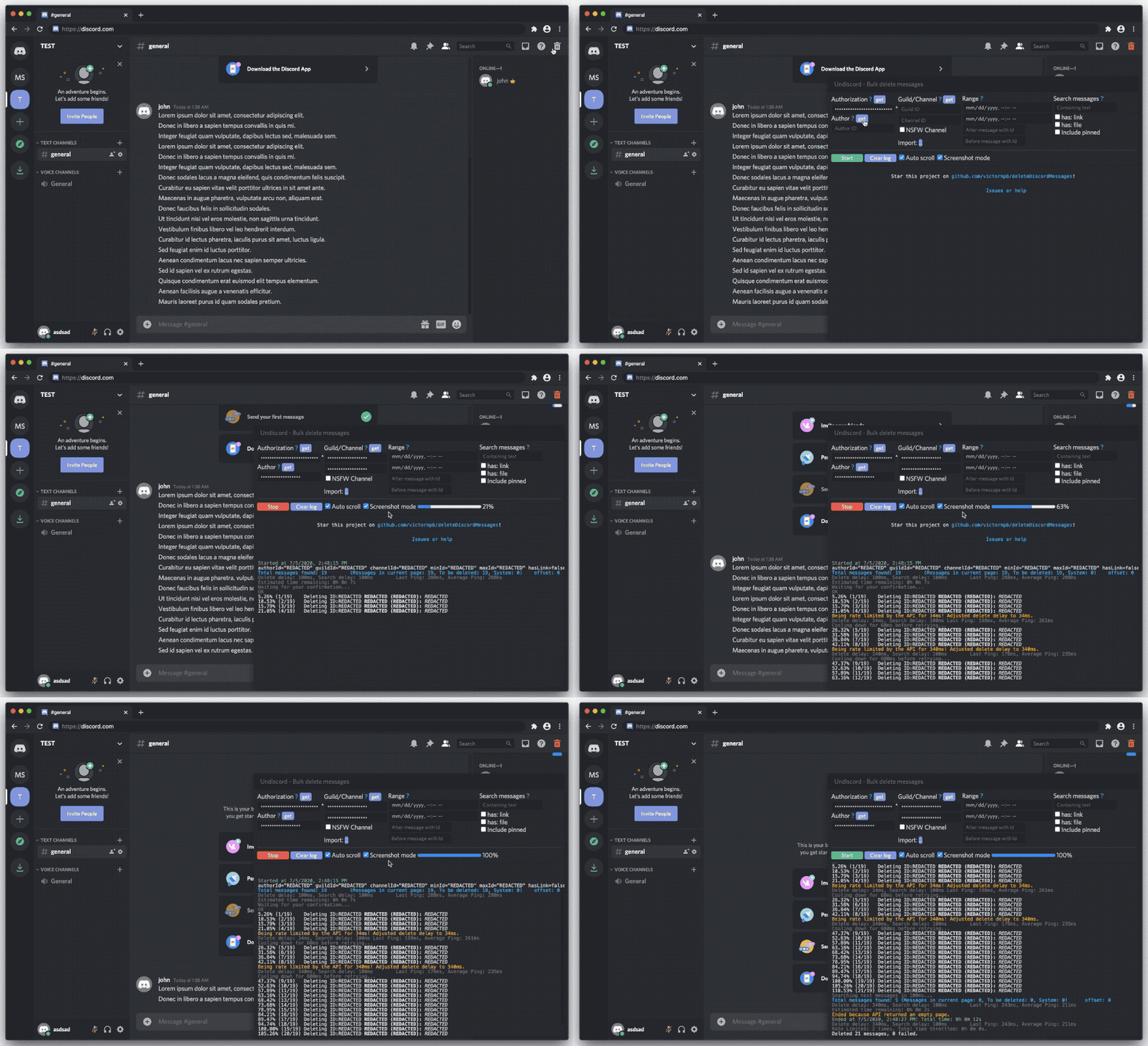
Open Discord in your browser (Not the App) and go to the Channel/Conversation you want to delete
Click the Trash icon that was added in the top right corner
Click on the blue buttons near Authorization, Author and Channel.
(Optional: getting authToken, authorId, channelId and messageId manually)Click the START button.
I made this tool just for you ❤️ , it would be awesome if you could just click the ⭐️ Star button at the top!
If you have issues or just need help open an issue here
A few extra generous people asked for this, so here you can buy me a coffee. Thank you! You’ll be in my special list ^_^
* Looking for the old Copy/Paste version? here
Features
- Fastest script out there, it auto adjusts the delay to be the fastest your internet and discords allows!
- Easy interface with instructions
- Respect discord API rate limits
- Auto detect current authToken, authorId, channelId
- It can delete a specific range of messages
- It can delete only links or attached files
- Comprehensive log of messages being deleted (with their content)
- Hide private information for taking screenshots
- Detects system messages and skips them like “You started a voice call”
- You can use your computer and discord while it is running (unlike macro key scripts)
- Start/stop whenever you want
- Works with even thousands of messages
Originally from https://gist.github.com/victornpb/135f5b346dea4decfc8f63ad7d9cc182
About running code on your console
I don’t recommend running code from random places you get on the internet. For that same reason, I deliberately choose to make it readable (that’s why it is a bit lenthy). That way people can analyze it and understand what does it does before running it, and be sure that nothing sketchy is happening under the hood.
DO NOT SHARE YOUR authToken!
Sharing your authToken on the internet will give full access to your account! There are bots gathering credentials all over the internet.
If you post your token by accident, LOGOUT from discord on that same browser you got that token imediately.
Changing your password will make sure that you get logged out of every device. I advice that you turn on 2FA afterwards.
If you are unsure do not share screenshots, or copy paste logs on the internet.
DISCLAIMER:
THE SOFTWARE AND ALL INFORMATION HERE IS PROVIDED “AS IS”, WITHOUT WARRANTY OF ANY KIND, EXPRESS OR IMPLIED, INCLUDING BUT NOT LIMITED TO THE WARRANTIES OF MERCHANTABILITY, FITNESS FOR A PARTICULAR PURPOSE AND NONINFRINGEMENT. IN NO EVENT SHALL THE AUTHORS OR COPYRIGHT HOLDERS BE LIABLE FOR ANY CLAIM, DAMAGES OR OTHER LIABILITY, WHETHER IN AN ACTION OF CONTRACT, TORT OR OTHERWISE, ARISING FROM, OUT OF OR IN CONNECTION WITH THE SOFTWARE OR THE USE OR OTHER DEALINGS IN THE SOFTWARE.By using any code or information provided here you are agreeing to all parts of the above Disclaimer.
