你正在訪問的內容是外部程式的映像位址,僅用於使用者加速訪問,本站無法保證其可靠性。當前的連結位址(單點即可複製)為 https://greasyfork.org.cn/zh-CN/scripts/481929-youtube-playlist-autoplay-button,源站連結 點此以跳轉。
YouTube Playlist Autoplay Button
Allows the user to toggle autoplaying to the next video once the current video ends. Stores the setting locally.
当前为
Origin of the script
- This is based on the YouTube Prevent Playlist Autoplay
License
- GNU GPLv3 license, credited to MegaScientifical (https://www.github.com/MegaScience)
Description
YouTube Prevent Playlist Autoplay / YouTube Playlist Autoplay Button
Some time ago, YouTube stopped providing the option for users to control autoplaying the next video within a playlist. This change disregards playlists such as Watch Later, where you may want to stop at the end of the current video or wait until the end to comment. (Especially problematic if the video in question doesn't have an end screen which would give you time to pause before the main content ends.)
This script works by controlling the property "canAutoAdvance_" which is set by YouTube. When this property is set to false, the playlist will not autoplay the next video.
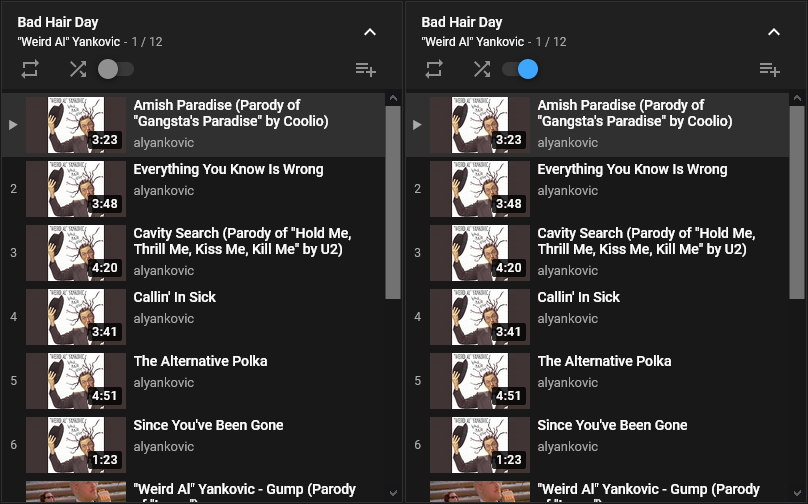
After installation, an autoplay toggle switch will be visible in the playlist headers on YouTube's website. Toggled left (default gray) prevents autoplay and toggled right (default blue) allows autoplay. The status of this toggle is stored locally and restored when the site is visited again from the same browser, so long as localStorage is not cleared.
Remarks
- It uses the technlogy same as Tabview Youtube and YouTube Super Fast Chat to achieve the robust implementation and high performance.
- This userscript supports Violentmonkey, Tampermonkey, Firemonkey, Stay, MeddleMonkey, etc. EXCEPT GreaseMonkey.
Testing
https://www.youtube.com/watch?v=T9yGcKlYAiw&list=PLD954AD90548599FE
Screenshot