Chess AI for Chess.com ♟️🤖
A powerful browser extension that enhances Chess.com with integrated Stockfish analysis, providing professional-level move suggestions, evaluation, and automated play options. 🚀
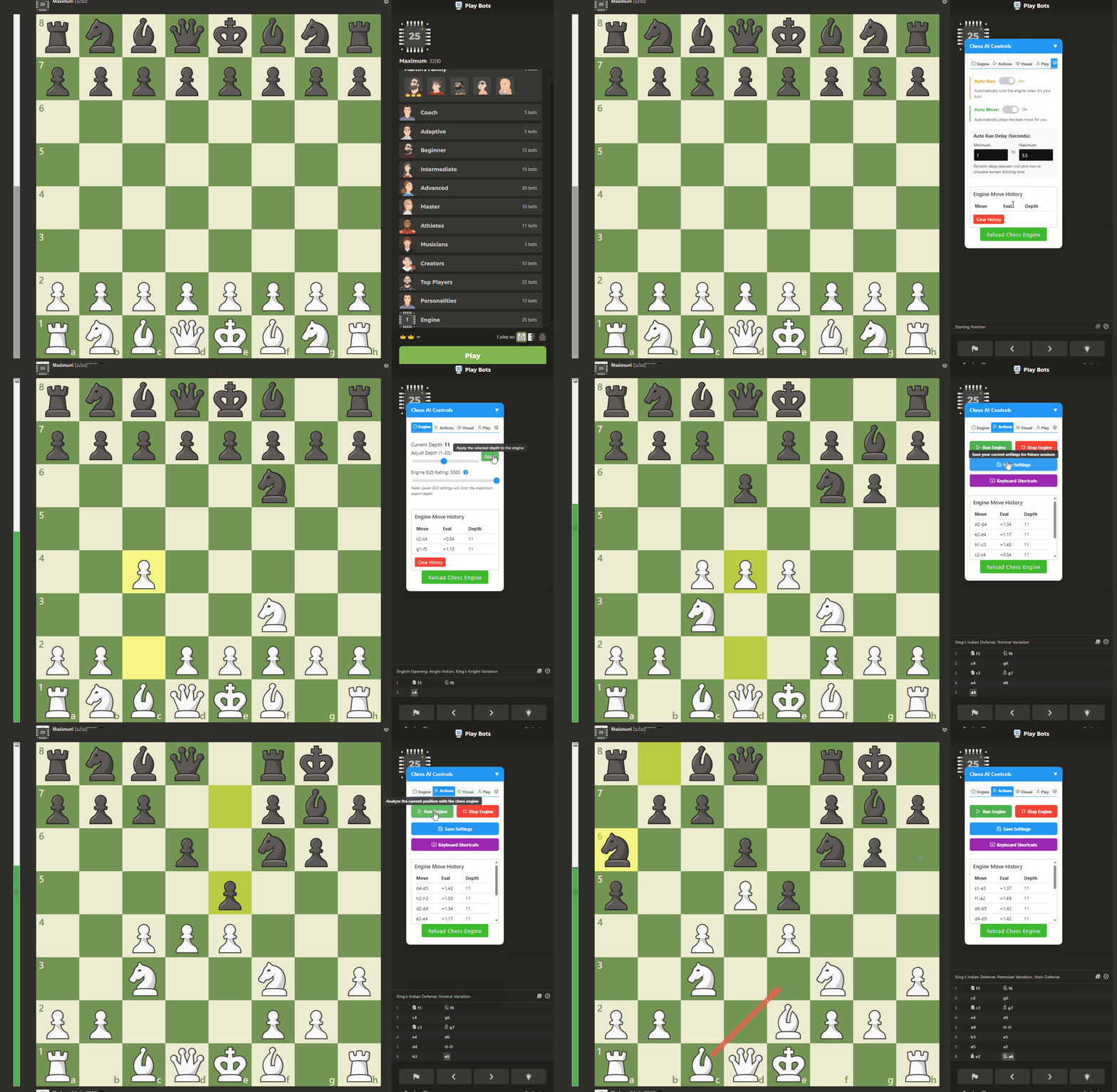
New Feature: Chess AI now supports an external window interface that allows you to control the engine from a separate window or tab, providing a cleaner Chess.com experience and more advanced visualization options!
Features ✨
- Advanced Move Analysis: Integrated Stockfish engine evaluates positions in real-time ⚡️
- Visual Move Indicators: Shows best moves with highlights or arrows on the board 🎯
- Adjustable Engine Strength: Set ELO ratings from 1000-3000 to match your skill level 🏆
- Dynamic Evaluation Bar: Visual representation of position advantage with customizable colors 📊
- Move History Tracking: Keeps record of analyzed moves with evaluation and depth 📜
- Human Mode: Makes the engine play more like a human with realistic timing and occasional mistakes 🧑🦱
- Fusion Mode: Automatically matches your opponent's rating for balanced play ⚖️
- Auto Run & Auto Move: Optionally automates analysis and move execution 🤖
- Full Keyboard Control: Quick access to all depths with keyboard shortcuts ⌨️
- External Window Interface: Open the Chess AI controls in a separate window or tab 🪟
- Multiple Move Display: View top 3-5 moves with opacity indicating move strength 🔢
- Comprehensive Settings: Fully customizable interface and behavior ⚙️
Installation 📥
Install a userscript manager:
- Tampermonkey (Chrome, Firefox, Edge, Safari) 🐒
- Violentmonkey (Chrome, Firefox) 🙈
Install Chess AI by clicking here
Visit Chess.com and the tool will automatically activate 🎉
Usage Guide 📖
Quick Start
- Go to Chess.com and start or join a game
- Press a letter key (Q-M) to analyze at different depths
- The best move will be highlighted on the board
- Use the evaluation bar on the left to see who has the advantage
Detailed Controls
Engine Depth
- Keys Q-Z: Run engine analysis at depths 1-26
- Q = depth 1 (fastest, weakest) 💨
- Z = depth 20 (slower, stronger) 🐢
- = (equals) = maximum depth ♾️
Settings Panel
The settings panel provides access to all features and is organized into tabs:
- Engine: Set depth and ELO rating
- Actions: Run/stop engine, save settings
- Visual: Customize evaluation bar colors, move indicators, and external window options
- Play Style: Configure Human Mode and Fusion Mode
- Auto: Set up automatic analysis and moves
The external window interface has its own settings tabs:
- Engine: Control depth and run/stop the engine
- Visual: Customize move indicators and evaluation bar
- Interface: Configure auto-run/move settings and main controls visibility
Human Mode
Makes the engine play with human-like characteristics:
- Adjustable skill levels from Beginner (~800 ELO) to Expert (~2400 ELO)
- Introduces realistic thinking time 🤔
- Occasionally plays suboptimal moves 😕
- Rarely makes blunders like a human would 🤯
Fusion Mode
When enabled, automatically adjusts engine strength to match your opponent's rating, creating a fair and balanced experience.
External Window Interface
The external window feature allows you to open the Chess AI controls in a separate window or tab:
Setup:
- Enable "Open GUI in external window" in the Visual Settings tab
- Download the Python server file using the provided link
- Run the server on your computer with
python chess_ai_server.py - Click "Start Local Server" to connect
- Click "Open External Window" to launch the interface
Features:
- Virtual chessboard showing the current position
- Customizable move indicators (highlights or arrows)
- Option to show move suggestions on external board only
- Multiple move display with color-coding for move strength
- Auto run and auto move controls with adjustable delay
- Ability to disable main controls when using external window
Benefits:
- Keeps your Chess.com interface clean
- Provides more detailed analysis view
- Reduces the risk of detection by chess.com
- Allows for more comprehensive visualization options
Keyboard Shortcuts ⌨️
| Key | Function | Strength Level |
|---|---|---|
| Q-E | Depths 1-3 | Beginner |
| R-P | Depths 4-10 | Intermediate |
| A-G | Depths 11-15 | Advanced |
| H-L | Depths 16-19 | Expert |
| Z-M | Depths 20-26 | Master |
| = | Maximum depth | Grandmaster |
Tips & Tricks 👍
- For casual analysis, depths 5-10 offer a good balance of speed and accuracy
- For critical positions, use depths 15+ for deeper analysis
- Enable persistent highlights to keep move suggestions visible
- Use Human Mode during practice to get more realistic opponent behavior
- Save your preferred settings for future sessions
- Use the external window interface for a cleaner Chess.com experience
- Set move indicators to "external" to hide them on the main board
- Enable "Show multiple moves" to see alternative options with their relative strength
- Use multicolor mode to easily distinguish between move suggestions
- Try different arrow styles (curved or straight) based on your preference
Disclaimer ⚠️
This tool is intended for analysis, learning, and casual play. Using automated tools in rated games may violate Chess.com's terms of service. Use responsibly and at your own risk.
Credits 🙌
- Created by longkidkoolstar
- Built with Stockfish, the world's strongest open-source chess engine
License 📜
This project is for personal use only and not for redistribution.