🔴 CURRENTLY WORKING ON AN UPDATE 🔴
VX-XIII Slither.io Mod Menu Guide
This guide explains all the features and controls available in the mod menu.
How to Use the Menu
- Toggle Menu: Press the
M key to show or hide the main menu.
- Draggable Windows: The main menu and the chat window are both draggable. Click and hold their top header bars to move them around your screen.
- Customization: Click the "▶ Menu Customization" text to expand options for changing the menu's name and accent color.
- Keybinds: To see all keybinds, click the "Keybinds" button. To change a keybind, click the "Set" button next to the action you want to change and then press the desired key.
I. Main Features
Movement
| Feature |
Keybind |
Description |
| Circle Restriction |
K |
When enabled, your snake cannot move its head outside of a virtual circle centered on the screen. This is useful for controlled, tight circling. |
| Circle Size |
J / L |
Press J to make the restriction circle smaller and L to make it larger. |
| Bot Movement |
A |
Toggles a simple bot that moves your snake in a continuous right-hand circle. Good for being AFK (Away From Keyboard) briefly. |
| Auto Boost |
B |
When enabled, your snake will continuously boost without you needing to hold down the mouse button or space bar. |
Zoom
| Feature |
Keybind |
Description |
| Zoom In |
Z |
Zooms the camera further in. |
| Zoom Out |
X |
Zooms the camera further out. |
| Reset Zoom |
C |
Instantly resets the zoom level to the default. |
Mods & Utilities
| Feature |
Keybind |
Description |
| Auto Respawn |
S |
Automatically respawns you after you die, so you can get back into the action faster. |
| Join DSC 4 VXIII |
Button |
A button with a direct link to the developer's Discord server for the next version. |
II. Visuals & Links
Visuals
| Feature |
Keybind |
Description |
| Performance Mode |
1, 2, 3 |
Switches between three graphics quality settings: 1 (Low), 2 (Balanced), and 3 (High). Lower settings can improve FPS on slower computers. |
| FPS Display |
F |
Toggles a small Frames-Per-Second counter at the bottom-right of your screen. |
| Death Sound |
V |
Toggles the custom sound effect that plays when you die. |
| Show Server IP |
T |
Toggles the visibility of the current server's IP address in the menu. |
| Trail |
Button |
Toggles a glowing trail that follows your mouse cursor. You can change the color of the trail with the color picker next to the button. |
| AFK |
Button |
A more advanced AFK bot. When toggled on, it will randomly press left and right arrow keys to keep your snake moving and prevent disconnection. |
Links
| Feature |
Keybind |
Description |
| GitHub |
G |
Opens the developer's GitHub page in a new tab. |
| Discord |
D |
Opens the official mod Discord server in a new tab. |
| GodMode |
Y |
Opens a related "GodMode" video on YouTube. |
| Reddit |
R |
Opens the r/Slitherio subreddit in a new tab. |
III. Status & Extra
This bottom section of the menu provides at-a-glance information and extra controls.
Status
| Info |
Description |
| Game State |
Shows whether you are currently in the main menu or in-game. |
| Zoom |
Displays your current zoom level as a percentage. |
| Test Ping |
A button to perform a quick ping test to Google to check your general connection latency. |
| FPS |
Shows your current Frames Per Second. |
| Keybinds |
Shows whether the mod's keybinds are currently enabled or disabled (toggle with -). |
Extra
| Feature |
Description |
| Server |
Displays the IP address of the server you are currently connected to (if "Show Server IP" is enabled). |
| Chat |
A button to quickly show or hide the entire chat window. |
| Change Nickname |
Allows you to change your in-game and chat nickname without having to refresh the page. |
| Donate |
A button that opens a PayPal link to support the mod developers. |
IV. Chat System
- Toggle Chat: Use the "CHAT" button in the "Extra" section or the
✖ in the chat window's header to show/hide it.
- Move & Resize: The chat window is draggable by its header and resizable by dragging the bottom-right corner.
- Chatting: Press
/ to focus the chat input box and start typing. Press Enter to send your message.
- User Profiles: Clicking on a user's name in the chat will bring up their profile, showing their avatar, status, and other info.
🔴 BETA 4.5 — TWO-WAY DISCORD BRIDGE, COSMETICS & MORE! 🔴
✅ This script works fully on its own and can be used directly here on Greasy Fork.
🔁 For an enhanced experience (as a browser extension), join our community on Discord!
💬 NEW: Two-Way Discord Chat Bridge!
Talk to the 143X Discord server directly from the in-game chat — and vice versa! All messages and GIFs sync between Discord and Slither.io in real time.
Need help or want more features? You’ll find the latest updates, browser extension, and support there.
But don’t worry — this version here still works great as a user script.
🖼️ PREVIEWS:
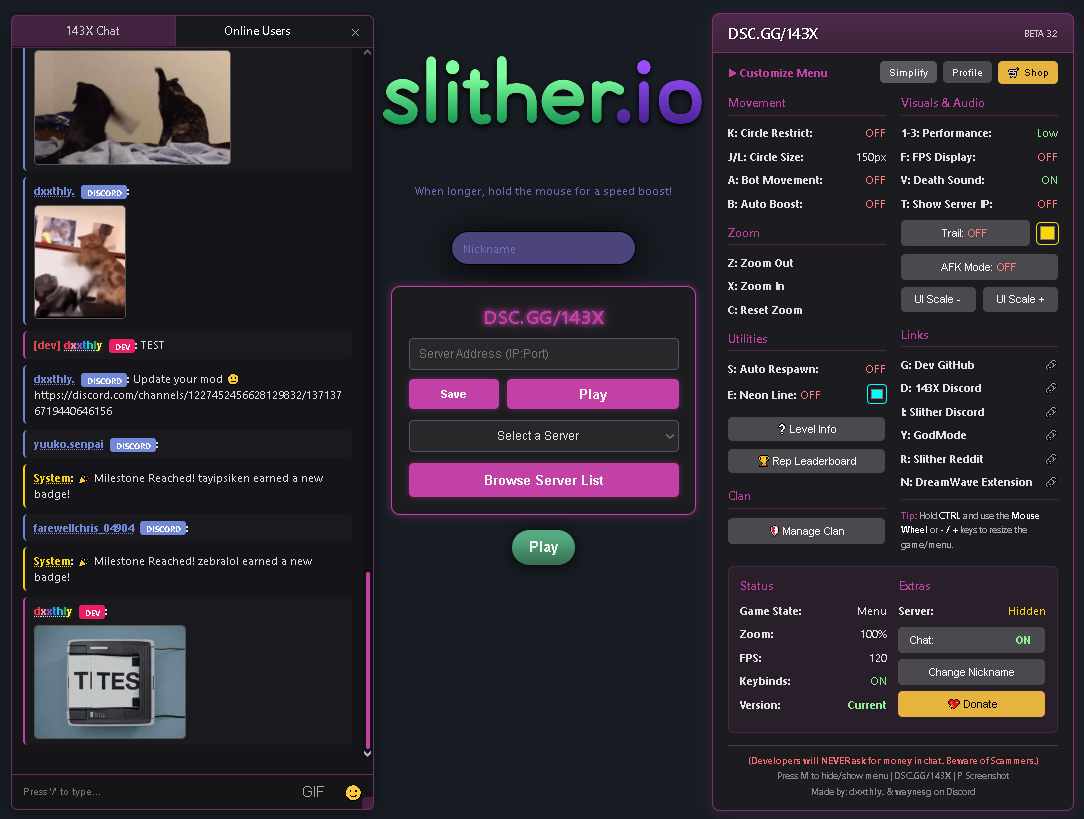
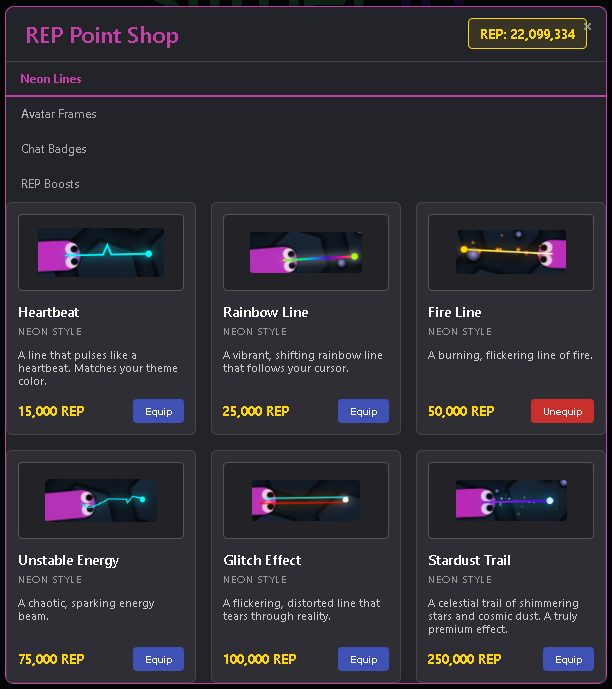
🔥 HIGHLIGHTED FEATURES:
💬 Two-Way Discord Integration
- Game chat messages are instantly relayed to the 143X Discord.
- Messages sent in Discord appear live in-game — fully themed and styled.
🎨 Name Effects & Cosmetics
- Equip animated name effects like Fire, Glitch, and Rainbow.
- Use REP to buy items in the expanded cosmetic shop.
🏆 Progression & REP Economy
- Level up through dozens of ranks from Hatchling to World Eater.
- New milestones, REP boosts, and updated shop pricing.
📈 Server Tools & Leaderboard
- "Recently Active" tab to find friends.
- Hide Discord bot from stats.
- Delete saved servers from your list.
⚙️ Stability & Fixes
- Improved chat loading.
- Fixed GIF display bugs.
- Resolved Enter key/game start issue.
🔧 Other Features (Script Version Still Includes):
- Auto Respawn & Boost
- Custom Zoom / Lock
- FPS Display
- Rebindable Keybinds
- Clan System
- Cosmetic Line Trails
- Screenshot Tool
- And tons more!
⌨️ KEYBINDS (All Customizable)
| 🔑 Key |
🔧 Function |
| M |
Open Mod Menu |
| E |
Toggle Neon Line |
| K |
Restrict Mouse |
| A |
Orbit Bot Mode |
| B |
Auto Boost |
| Z/X/C |
Zoom In/Out/Reset |
| S |
Auto Respawn |
| 1–3 |
Performance Modes |
| F |
FPS Toggle |
| T |
Show Server IP |
| G/D/R/I |
GitHub / Discord / Reddit / Slither DSC |
| / |
Focus Chat |
🌐 Links
🏆 Credits
🛠️ This user script works fully on Greasy Fork — the Discord version is just an optional bonus.