你正在訪問的內容是外部程式的映像位址,僅用於使用者加速訪問,本站無法保證其可靠性。當前的連結位址(單點即可複製)為 https://greasyfork.org.cn/zh-CN/scripts/549571-ao3-chapter-shortcuts,源站連結 點此以跳轉。
AO3: Chapter Shortcuts
Adds a customizable shortcut to the latest chapter of a work, as well as shortcuts for first and last chapters on chapter pages.
当前为
AO3 Chapter Shortcuts
Overview
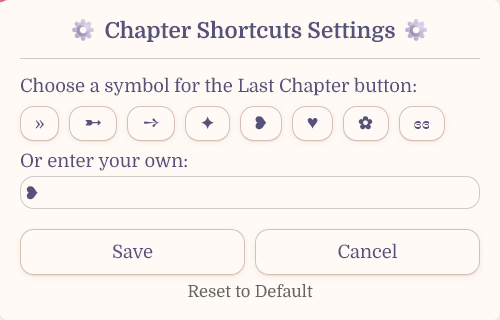
Sick of the multiple clicks it takes to get to the latest chapter of a work you're reading? Well worry no more! This userscript adds a small icon next to the author names on works which will take you to the latest chapter. You can even specify the symbol you want for the button.
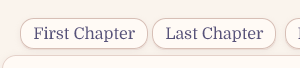
Additionally, first and last chapter shortcuts have been added to the work pages.
Installation
Step 1: Install a Userscript Manager
Choose one of the following userscript managers for your browser. Both options allow you to sync your scripts across devices using Google Drive, Dropbox, etc.
Tampermonkey (Recommended for iOS users)
- Chrome/Chromium: Chrome Web Store
- Firefox: Firefox Add-ons
- Safari: Mac App Store
- Edge: Microsoft Store
Violentmonkey (Open Source)
- Chrome/Chromium: Chrome Web Store
- Firefox: Firefox Add-ons (works on mobile Firefox too)
- Edge: Microsoft Store
Step 2: Install the Userscript
After installing your userscript manager, click the installation in the top left. Your userscript manager will automatically detect the script and prompt you to install it.
The script will automatically run on AO3 once installed. No additional configuration needed!
Configuration
After installation, you can customize the shortcut icon by accessing the userscript's settings under the 'Userscripts' menu on the header. Choose from various symbols or use your own preferred character.
Credits
- AO3 Review + Last Chapter Shortcut + Kudos-sortable Bookmarks by saxamaphone (maintained by Fangirlishness)
Made with ❤️ for the AO3 community